GPT Image 2.6 Generator & Editor
Create an image from a description or edit a photo with OpenAI’s GPT Image 2.6, the model family behind ChatGPT Images 2.6. Choose Flare to explore ideas quickly or Sunburst for a detailed brief. Both can also make a short animated GIF from text.
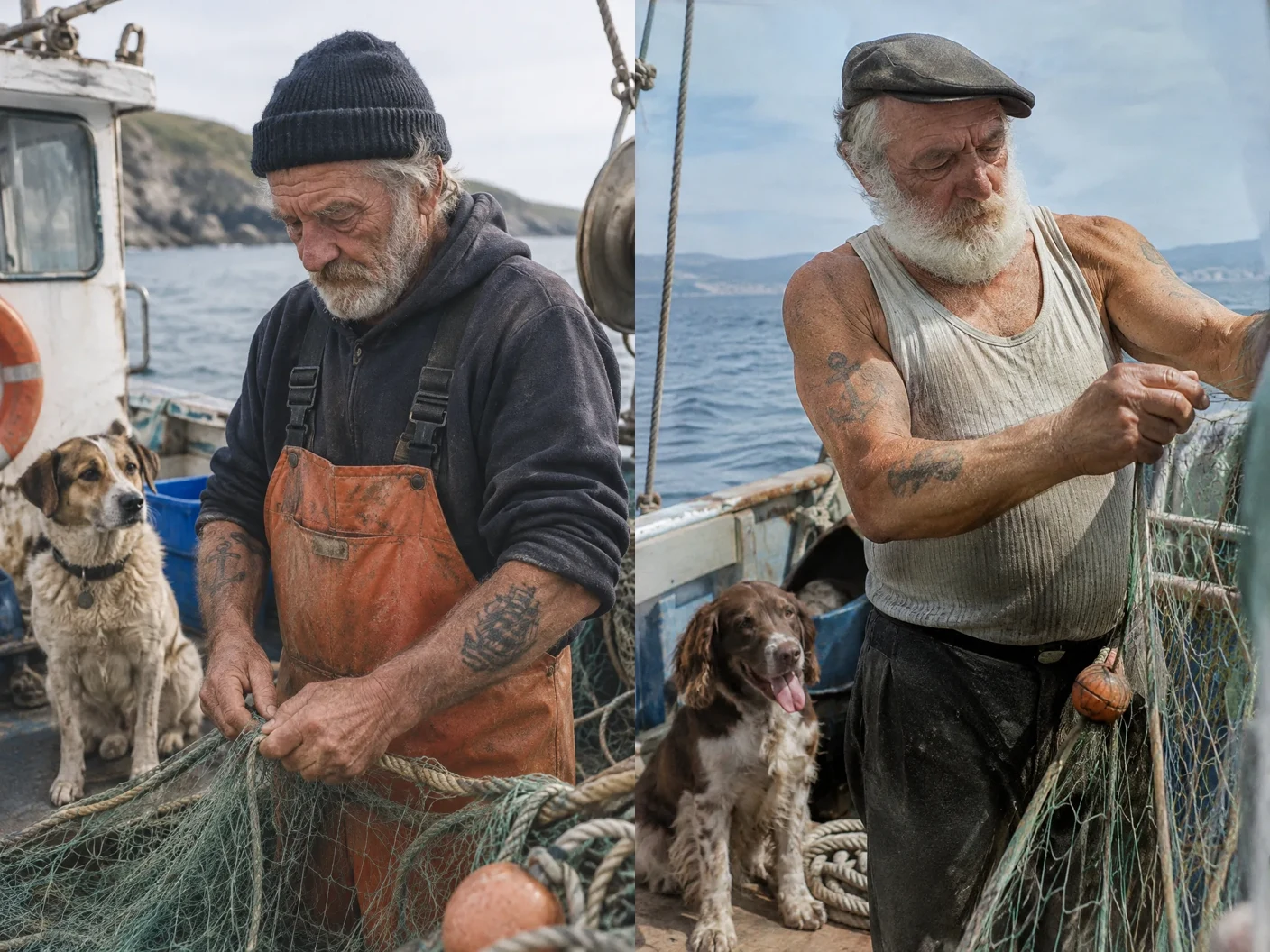
GPT Image 2.6 Flare or Sunburst?
Flare is on the left and Sunburst is on the right. OpenAI gave both models the same brief: a sailor mending a net, with a dog nearby. Flare gives the fisherman an orange bib and puts the dog beside his hand. Sunburst gives him a flat cap and frames his arm against open water. Both answer the brief; they also make different decisions about the person, light, and composition. If one of those details belongs to your story, spell it out or supply a reference photo.
Start with Flare when the open question is what should this look like? It is the faster of the two variants by design. A few directions for the same book jacket can help you pick a visual idea before you spend time refining the type and illustration.
Open the Sunburst editor when the question is can I change this particular thing and keep the rest? Bring the jacket you chose, name the element to change, and identify the lettering or illustration that should stay. Switching variants with only the original text gives the model room to invent a different jacket.
GPT Image 2.6 vs 2.5: when is the upgrade useful?
| What you need | What to choose |
|---|---|
| A new image in the style of an ongoing 2.5 series | Start with GPT Image 2.5 and an approved reference. Changing versions adds another variable when the aim is continuity. |
| A single edit with several conditions to preserve | Try 2.6 Sunburst. Use the original as a reference and give it the exact changes and constraints. Check the result against the original. |
| A short animated reaction | Choose 2.6 in text-to-image mode and select GIF. Describe one action that can return to its starting pose. |
| A still for an unusually wide 4:1 placement | Nano Banana 2.1 offers a native 4:1 canvas here. The widest explicit GPT Image 2.6 preset is 21:9. |
For an ordinary photo edit, a newer version may give you little reason to redo finished work. In PicOnTap’s published comparison of three 1K Sunburst edits, both versions handled a sweater recolor and a product background change. The difference showed up when removing a sign: 2.5 added flowers in the cleared space, while 2.6 continued the crate behind it. If your brief involves removal, look at what fills the gap as well as whether the object disappeared.
What quality and complexity change
Complexity controls how much planning the model does. If your brief specifies a diagram with a particular reading order, labels in two languages, and arrows between named parts, there are relationships to work out before drawing begins. Quality controls rendering detail. On a portrait, that might mean the texture of a wool cap or the strands of the net. Raising rendering quality alone won’t tell the model where a missing arrow belongs.
For a first pass, keep complexity on Auto and choose an output size that lets you judge the composition. Once the design reads correctly, choose the resolution for the final placement. A 4K still gives you more pixels to inspect or crop. It also makes an incorrect name or digit easier to see, so proofread important text at the size it will actually appear.
Choose the file you need
Use PNG for sharp type, logos, or line work; JPG works well for a photographic still; WebP is a good option for an image-heavy web page. For a GIF, switch to text-to-image and describe a repeating action, such as a lantern swinging back to its starting point. A single clean movement usually reads better at sticker size than several things happening at once.
You can review the estimate in the generator after choosing your settings. See current plans for account options, or start a GPT Image 2.6 generation to compare the choices for your own brief.
Frequently Asked Questions
What would you like to make?
Start from a description, or bring a photo if there’s something you already want to keep.
Generate an imageExplore More AI Models
GPT Image 2.5 Image Generator & Editor
Create and edit images online with GPT Image 2.5. Choose Flare or Sunburst for product photos, posters, and reference-based edits, with output options up to 4K.
GPT Image 2 AI Image Generator | Thinking, Free
Create AI images with GPT Image 2 — OpenAI's reasoning model with multilingual text, character consistency, and 4K output. Free on ChatGPT Image.